The Social Media Report Card: Infographic

2012 Social Media Report Card Infographic Pardot

2012 was a very eventful year for the social media world. (understatement, I know!) Between acquisitions, introductions of new platforms, and grand site design changes, social media was an ever changing environment. Each time things seemed to calmed down, and marketers could catch their breath for a moment, things got flipped upside-down again. But, even though social media last year was a constantly changing arena, it is important for businesses to understand where each of the social media leaders stood at the end of the year; in addition to the opportunities and threats that face each platform during 2013. Continue reading

About these ads

Social Media’s Biggest Blunders Infographic

With millions of people using social media every day and growing, it is more crucial than ever that you are prepared for any difficult situations that may arise, such as Facebook post or Tweet that was never supposed to have been published. Luckily, there are a many examples of social media screw-ups that we can learn from. Continue reading

6 Tips for Effective Email Marketing

Today’s consumers are being hit with sales messages from all directions; while watching TV, reading magazines (paper or tablet version), browsing the web, checking out what their friends are up to on Facebook, checking their email, and more. However, even with all the different ways consumers are being targeted they still have the power to ignore, or in the case of email marketing delete, sales messages targeted at them.

When it comes to email marketing, there is a very short time frame in which to draw the recipient in and convert them into a customer. Pardot, a leader in marketing automation, created a great infographic to help companies understand the six essential components of effective email marketing. The infographic below does a stellar job breaking down the six components into easy to understand and apply tools. Also, check out a quick recap below for tips and takeaways.

The 6 Essentials of an Effective Email [Snapshot] - Pardot Infographic

Embedded from the Pardot Blog

Continue reading

What’s Their Worth? Facebook Vs. Pinterest Visitors

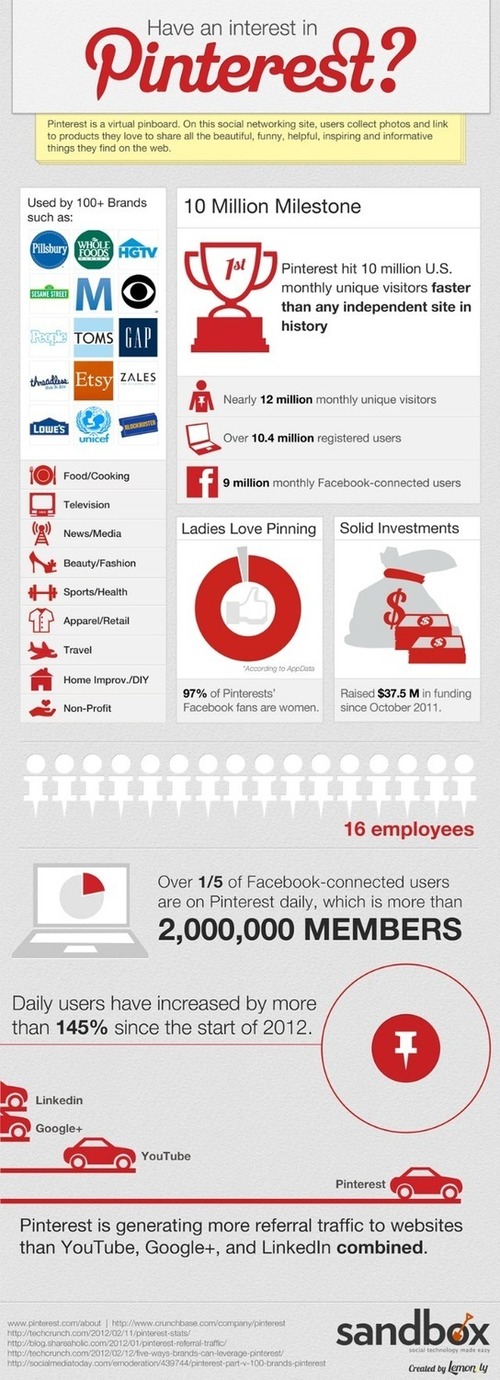
Pinterest has become a great sales tool for companies already using, and those beginning to use, social media to connect with their customers. It has also grown into one of the most popular social media platforms.

But, can it really compete with the “Big Kahuna” of social media, Facebook?

Does Pinterest drive valuable site traffic?

Do Pinterest users have a greater connection with the brands they follow?

Luckily, Boticca created a great infographic to answer some of these questions regarding “who does it better”, Facebook or Pinterest. For the infographic data, Boticca analyzed 50,000 Pinterest users and 50,000 Facebook users. They share their five most interesting findings in this fun infographic below. Continue reading

Stand Out With An Infographic Resume

Infographic Resume Timeline

With hundreds of applicants applying for every job right now, how do you make your resume stand out from the rest? One way is by creating an infographic resume.

My favorite tool for building a visual, dynamic, and interactive resume is Re.Vu. Re.Vu calls its self the “Cure for the Common Resume”. They not only offer free tools for creating your dynamic resume, they also let you select a custom Re.Vu url to direct people to.

There a many different options on Re.Vu to display your work experience, so you will never see two identical Re.Vu resumes. The idea of creating an infographic resume may seem overwhelming, but Re.Vu makes it very easy. By linking your LinkedIn account to your Re.Vu account, all your past and present work information is imported. This makes it really simple to create all the visual graphs, that make your resume pop.

When you begin building your infographic resume, create a biography that explains who you are and what you do, and upload a traditional resume so employers can download it.

Add Social Media to Your Infographic Resume

A great feature of Re.Vu is that you can add links to all your social media profiles to your infographic resume, including:

LinkedIn Facebook Twitter
WordPress Tumblr Google+
YouTube Flickr Stumbleupon
FourSquare Digg Blogger
Vimeo Slide Share Myspace
Picasa Posterous Reddit

Visual Timeline of Your Experience

You can also create a visual timeline, based on the information imported from LinkedIn. The timeline will visually display your work history. Below is an example of what the visual timeline looks like. You can include a detailed description for each entry that will appear on your profile in a popover window when someone clicks on an event.

Infographic Resume Timeline

Integrating Graphs Into Your Infographic

On Re.Vu you can create 9 different infographics to add to your resume. You can add one or all of the following infographics to your resume:Job Duties Infographic Resume

  1. Vital Stats: Your Top Quantifiable Achievements
  2. Job Duties: How You Spend Your Time At Work
  3. Skill evolution: How Your Skills Evolved Over Time
  4. Proficiencies: Your Skill Proficiencies
  5. Quotes: Something Fantastic Someone Has Said About Your Work
  6. Percentages: Your Accomplishments That Can Best Be Expressed As Percentages
  7. Pastimes: How You Spend Your Time When You Aren’t Working
  8. Interest: How Your Interests Have Evolved Over Time
  9. Languages: Languages That Your SpeakSkill Levels Infographic ResumeInterests Infographic Resume

Re.Vu also lets you display your portfolio in your infographic and upload work examples that potential employers can download. In addition, you can promote your resume through Facebook, Twitter, and LinkedIn. You can also create a QR code to promote your infographic.  You can put it on  your business card to direct people to your infographic resume.  After you start promoting your resume, you can track profile views, resume downloads, and work example downloads on the profile statistics page.

Check out my Re.Vu profile for an example of the dynamic infographic resume you can make. View my profile page on re.vu page!

Using an infographic resume may not be the right approach if you are applying for a job in the accounting or scientific industries, but it is definitely a great tool for applying to jobs in the marketing, design, and media industries. Have fun building your dynamic resume!!!

Have you created an infographic resume before? Do you think you would use an infographic resume to apply for a job? Leave a comment below!!!